Generate a tattoo stencil from a text idea or a sketch.
Type what the client asked for, or photograph a quick pencil thumbnail. The AI in Stencify generates stencil linework in about 30 seconds, and you refine it by writing what should change.
Rated 4.8 on the App Store · iPhone, iPad and Android
Two free uses, then $4.99 a week or $47.99 a year (US). See pricing
- Text to stencil
- Edit by prompt
- Try it on first
A rough sketch, finished as linework
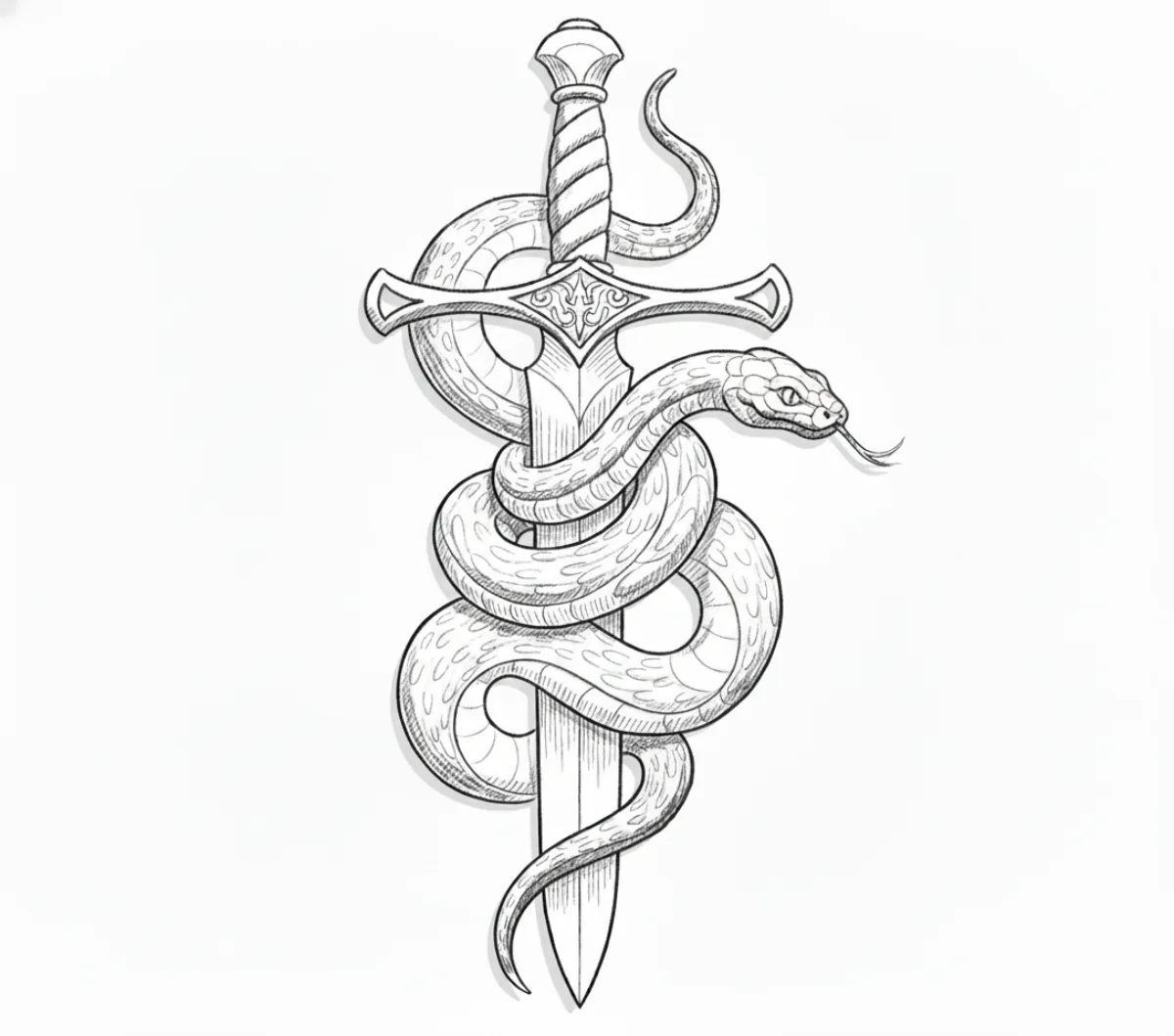
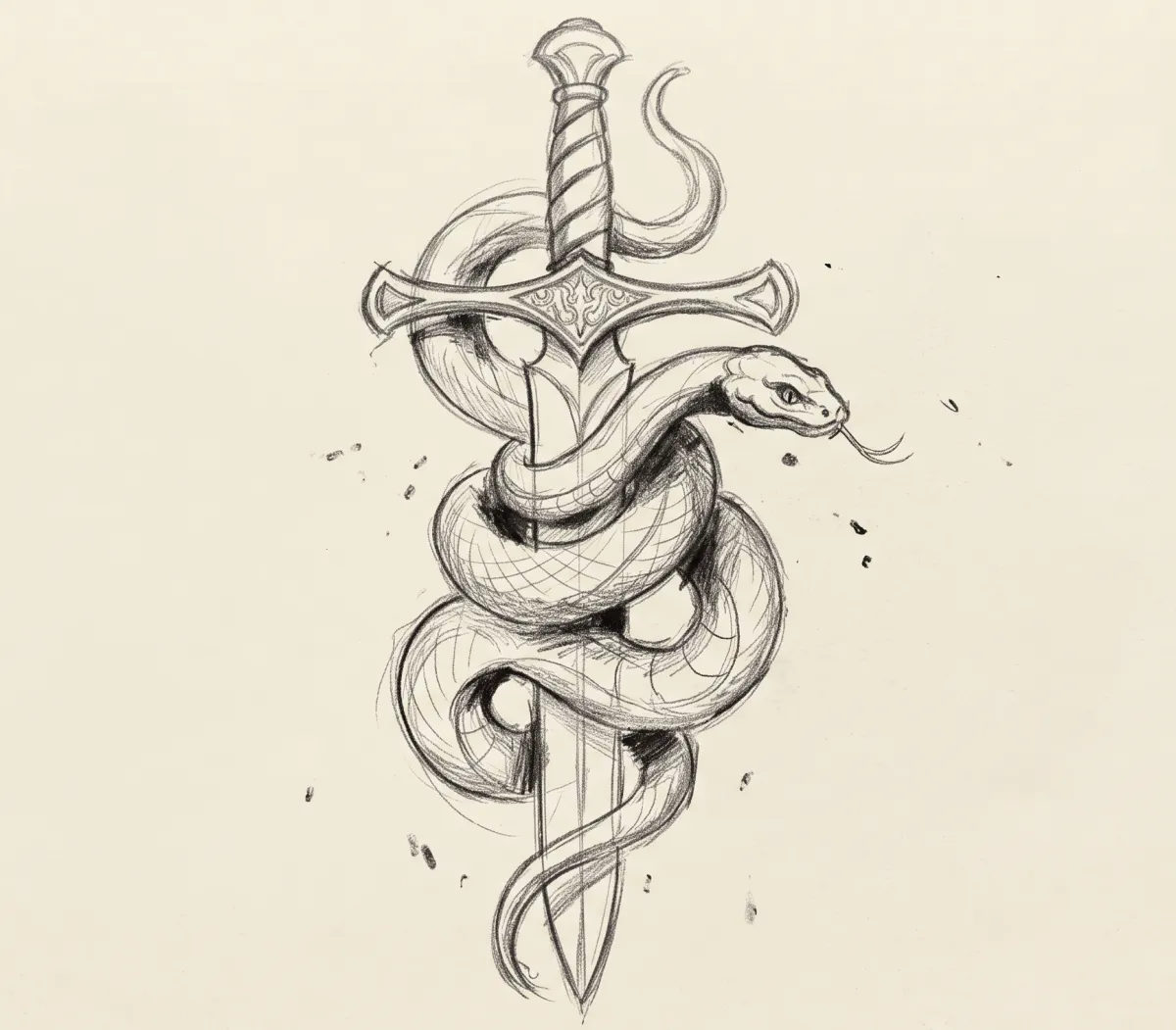
This thumbnail was drawn in pencil, photographed on paper and sent straight to the generator. Drag to compare the input with the stencil it produced.
 Stencil
 Sketch
What the generator did with the sketch
-
Overlapping strokes became one line
Searching pencil marks were resolved into a single confident edge.
-
Shading turned into structure
Soft graphite tone was dropped, and the forms it described were kept as lines.
-
The composition stayed yours
Layout, proportions and the wrap of the snake came from the sketch, not from the AI.
How the stencil generator works
Start from words, from a drawing, or from both, then edit the result by typing.
-
01
Describe it or sketch it
Write a short brief covering subject, style and the elements to include, or upload a photo of a thumbnail sketch.
-
02
Generate, then edit by prompt
The AI returns linework in about 30 seconds. If something is off, type the change, such as “make the blade longer”, instead of starting over.
-
03
Check placement, then export
Use AI try-on to see the design on a body model or a client photo, then save a PNG or PDF for your printer.
Writing prompts that give usable stencils
The generator works best when the prompt reads like a brief from one artist to another. A few habits make a clear difference to what comes back.
Name the subject and the style
“Snake wrapped around a dagger, American traditional” gives the AI two clear decisions to work from. “Cool snake tattoo” leaves it guessing about everything.
Say what to leave out
Stencils need open skin. Ask for no background, minimal shading or a simple outline when the piece is small or the client wants fine line.
Change one thing per edit
When editing by prompt, ask for one change per message. It is much easier to see what each instruction did and to judge whether it helped.
Use a sketch when layout matters
For a piece that wraps a forearm or has to fit between existing tattoos, a quick pencil drawing tells the AI more about placement than a long paragraph. Upload the sketch and use words for the details.
If you are weighing up general AI art apps against a stencil tool, our article on AI tattoo generators vs stencil makers explains the difference. For why some generated designs transfer better than others, read about contrast and flow in a stencil.
What the generator gives you
Generation is only the first draft. The rest of the tools get that draft onto paper.
Text to stencil
Create original linework from a written description when there is no reference image to work from.
Sketch to stencil
Turn thumbnails and pencil drafts into lines you can follow with the machine, keeping your own composition.
Edit by prompt
Add, remove or change elements of a generated design in plain English, without redrawing it.
Line weight and contrast
Decide how bold the generated lines are and how much interior detail survives into the stencil.
AI try-on
See the scale and placement of a new design on a body model or a client photo before committing to it.
Print-ready files
Export a PNG or a PDF on A4 or US Letter for a thermal stencil printer or an inkjet.


Stencil generator questions
What is an AI tattoo stencil generator?⌄
It is a tool that creates stencil linework from a written description or a sketch, rather than tracing an existing photo. Stencify does both, and it also converts photos.
Do I need to be able to draw?⌄
No. A text description is enough to generate a design. If you do draw, a rough sketch gives you more control over composition and proportions.
Can I change a generated design?⌄
Yes. Type what you want changed and the AI edits the stencil. Line weight and contrast can also be adjusted directly with the controls.
How is this different from an AI tattoo design app?⌄
Design apps usually produce shaded or coloured artwork that still has to be traced before it can be transferred. Stencify outputs stencil linework you can print onto stencil paper, which is the step that matters at the station.
Which devices does the generator run on?⌄
iPhone, iPad and Android. There is no web version. Two free uses are included, then it is $4.99 a week or $47.99 a year in the US. See pricing.
Bring the idea, leave with a stencil
Install Stencify, describe the design or photograph the sketch, and edit until the linework matches the brief.
Available on iPhone, iPad and Android
